
Transaction Status
Amwal payment transactions move through distinct statuses as they progress from initiation to completion. This page explains payment link statuses, transaction statuses, and how they transition through the payment lifecycle.
Payment Link Status
Payment links represent the overall state of a payment request. Each link has one of the following statuses:
| Status | Description |
|---|---|
| Unpaid | Payment initiated but not Paid or Expired |
| Paid | Payment is Paid |
| Expired | Payment link is expired and not able to pay. |
Transaction Status
Individual transactions within a payment can transition through multiple statuses. Each transaction has one of the following states:
| Status | Code | Description |
|---|---|---|
| Payment initiated | pending | Transaction created and submitted to payment gateway, awaiting further action from user / bank gateway. |
| Success | success | Transaction completed successfully. |
| Fail | fail | Transaction failed due to one of the failed reasons |
| Partially refunded | partially refunded | Partial refund processed and returned to customer |
| Refunded | refunded | Full refund processed and returned to customer |
Status Workflow
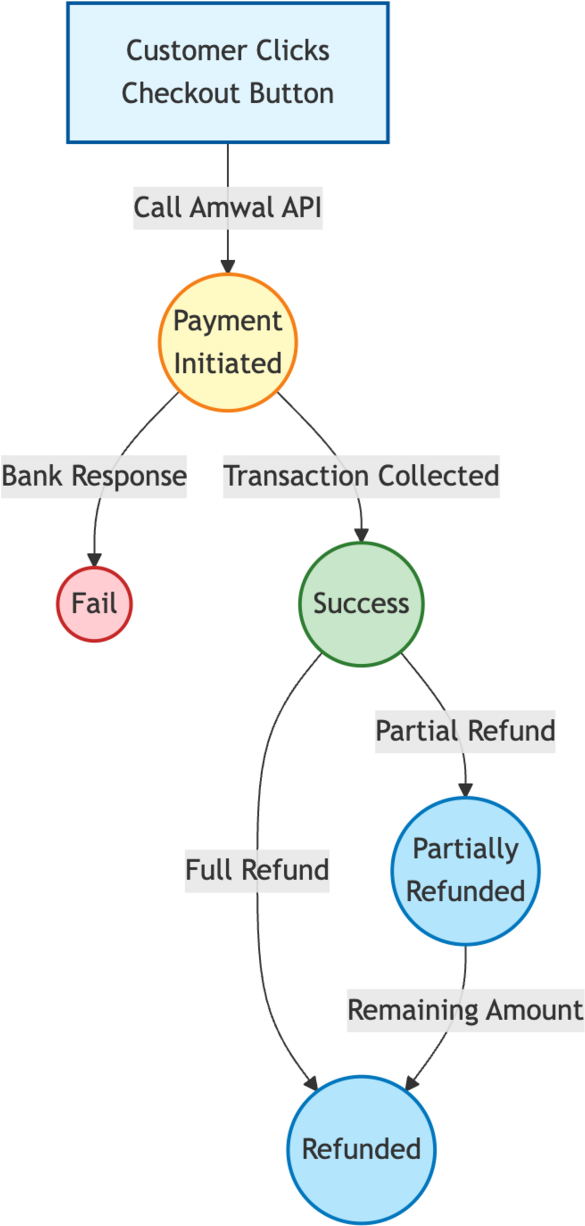
The diagram below shows how transactions flow between statuses. A transaction starts as pending, then moves to either success or fail. Successful transactions can be partially or fully refunded.
Callback URL
If you include the
callback_urlparameter when creating a payment link, Amwal sends the transaction status to that URL. Use thetransaction_idfrom the callback request to retrieve the full transaction details through the transaction details endpoint.The callback transaction status can be
pending,success, orfail.
Failure Reasons
The corresponding failed transaction may occur for multiple reasons, depending on the bank gateway response or user behavior.
Refer to the Transaction Failed Reasons for more details.
💡What is next?
Returns comprehensive payment details including customer info, order details, status, and transaction(s) information.
POST /payment-links/{payment_link_id}/detailsReturns detailed transaction information for a certain transaction ID.
GET /payment_links/transaction/{transaction_id}/detailsUpdated 3 months ago