
Refund a Payment
Amwal allows merchants to issue full and partial payment refunds directly from the Merchant Dashboard without needing to contact bank gateways. Refunds are processed through the original payment rail (Mada, Visa, Mastercard, or Bank Installment provider), returning funds to the buyer's original card or bank account.
1. Locating the Transaction for Refund
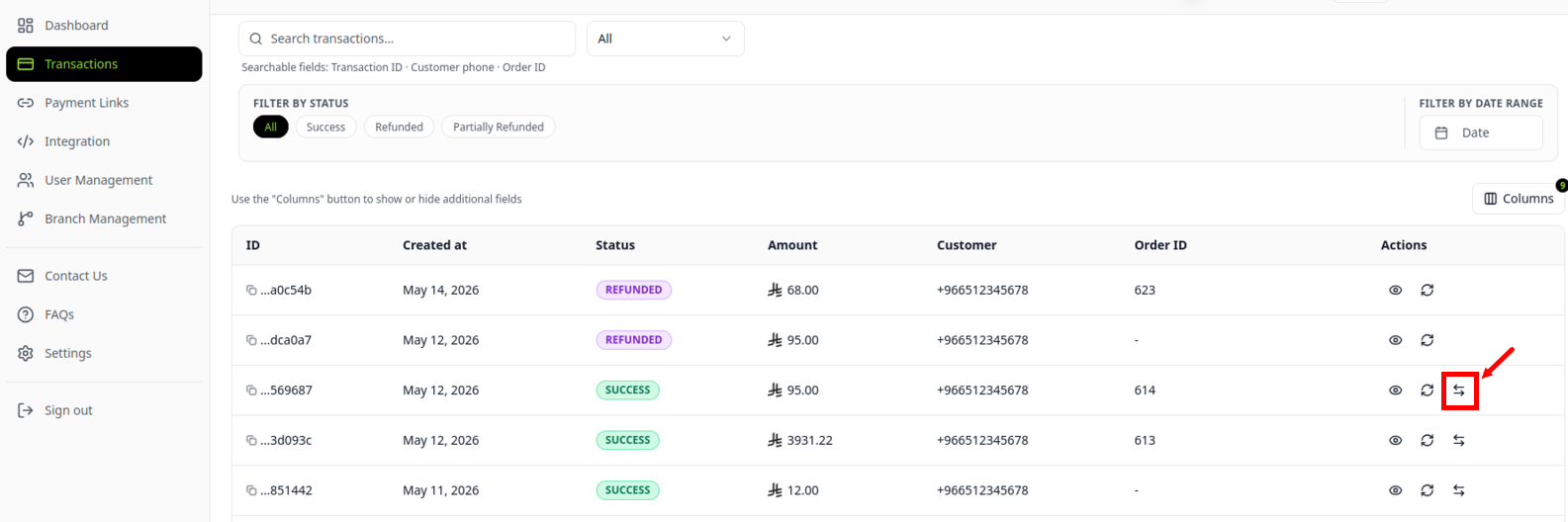
- Open Transactions from the left sidebar navigation.
- Search for the transaction using the order reference, buyer phone number, or transaction UUID.
- Scroll to the right side of the transaction row and click Refund.
2. Refund Confirmation Modal & Fee Accounting
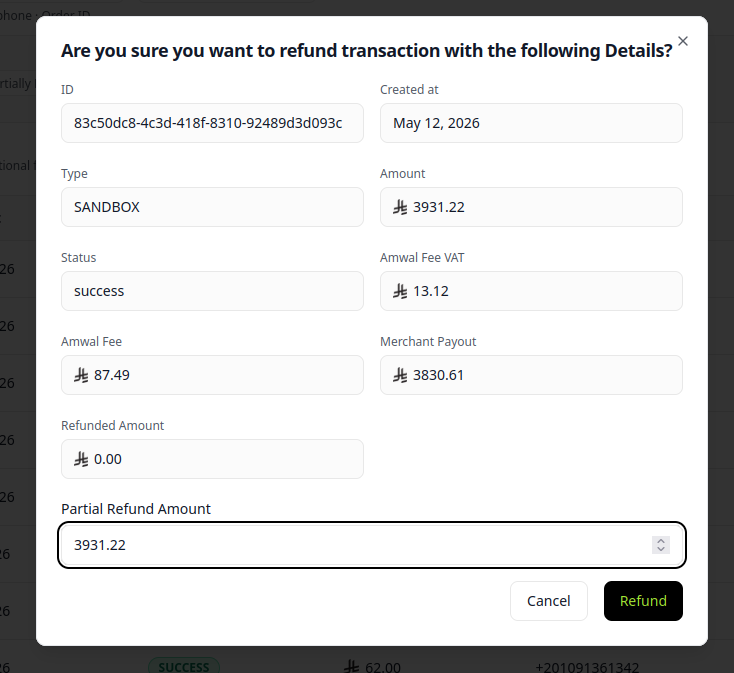
When you click Refund, the dashboard displays an itemized financial calculation for the reversal:
Summary Breakdown Fields
| Field Name | Description | Example |
|---|---|---|
| Transaction ID | Unique Amwal payment reference. | ccdaaba6-350e-43e8-xxxx |
| Created At | Original payment authorization date and time. | May 19, 2026 05:30:23 |
| Type | Payment scheme used (e.g. Apple Pay, Mada, VISA). | Mada (Apple Pay) |
| Original Amount | Total original purchase value in SAR. | SAR 500.00 |
| Amwal Fee & VAT | Prorated gateway MDR fee and 15% VAT reversal calculation. | SAR 7.50 |
| Merchant Payout Impact | Net deduction adjusted against your next settlement batch. | SAR 492.50 |
3. Partial vs. Full Refund Mechanics
- Full Refund: Leave the default maximum amount in the input field. The entire transaction is reversed, and the status transitions to Refunded.
- Partial Refund: Enter any custom amount less than the original captured total. The transaction status transitions to Partially Refunded. You can issue multiple partial refunds against a single transaction until the full original amount is exhausted.
Multiple Partial Refunds (1-Hour Window)
When you submit multiple partial refund requests for the same transaction ID within one hour, the first request is marked as Refunded and subsequent requests are marked as Pending. This behavior is identical in both sandbox and live environments.
4. Banking Scheme Timeframes & Rules
SAMA Scheme Refund Windows
In accordance with Saudi Central Bank (SAMA) payment scheme standards:
- Mada Debit Cards: Refunds must be initiated within 30 calendar days of the original authorization date.
- Credit Cards (Visa / Mastercard): Refunds must be initiated within 60 calendar days of the original authorization date.
Installment Plan Reversals
If the buyer purchased goods using 0% Bank Installments:
- When you issue a refund via Amwal, the issuing bank automatically cancels the customer's remaining future installment schedules.
- Any installment payments already debited from the customer's account are credited back to their card within 3–5 business days.
5. Webhooks & System Synchronization
Every refund processed from the dashboard triggers an order.updated webhook containing the updated refund_details and remaining available balance, enabling your ERP or e-commerce backend (Shopify, WooCommerce, Magento) to adjust inventory and order statuses automatically.
Transactions
In-depth guide to auditing real-time transaction feeds, inspecting payment drilldown metadata, monitoring authorization statuses, and searching order records.
Statements & Reports
Access, filter, and export daily settlement payout statements, SARIE interbank reconciliations, and ZATCA-compliant electronic VAT tax invoices.