
Create Payment Link
Amwal Payment Links allow merchants to collect payments without writing code or requiring an integrated e-commerce website. You can generate custom payment URLs and scannable QR codes for social commerce (WhatsApp, Instagram), telesales and call centers, remote invoice collections, and in-store POS retail counters.
1. Step-by-Step Payment Link Generation
Step 1: Open Payment Link Form
From the left navigation menu, open Create Payment Link (or navigate to Payment Link → Create):
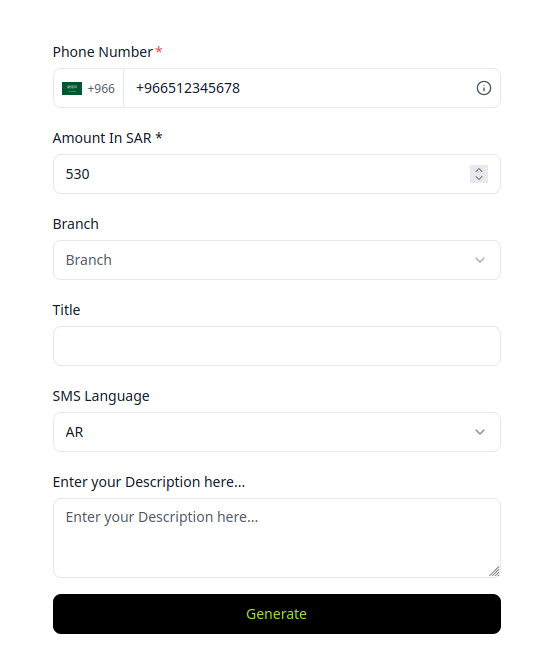
Step 2: Complete Link Parameters
| Parameter | Required | Type | Description | Example |
|---|---|---|---|---|
| Phone Number | Yes | String | Customer mobile number with country code. Receives the automated checkout SMS. | +966501234567 |
| Amount in SAR | Yes | Number | Total transaction amount in Saudi Riyals. | 1250.00 |
| Branch | Optional | Select | Assigns the sale to a physical store location for localized commission and accounting. | Riyadh Olaya Branch |
| Title | Optional | String | Internal invoice reference or item description. | Order #8921 - Gold Necklace |
| SMS Language | Yes | Select | Language of the automated SMS notification sent to the customer (Arabic or English). | Arabic (العربية) |
| Description | Optional | String | Customer-facing note displayed on the hosted checkout page. | Includes 15% VAT and free delivery |
Click Generate to create the payment link.
2. Real-Time Confirmation & Dispatch Options
Upon generation, the Payment Link Generated modal appears, providing immediate omnichannel sharing tools:
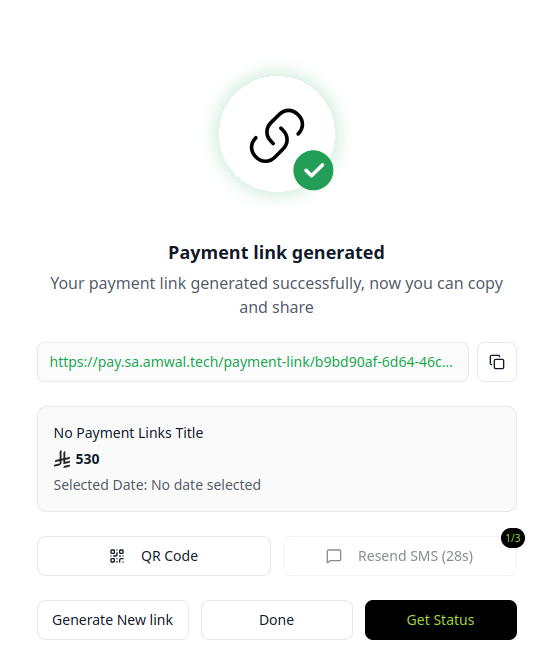
Actions Available:
- Copy Payment URL: Copy the secure, shortened HTTPS payment URL to send directly via WhatsApp, Instagram DM, email, or chat.
- Present Dynamic QR Code: Display a large, high-resolution QR code on your POS terminal or tablet for the buyer to scan with their smartphone camera.
- Resend SMS: If the customer hasn't received the text message, click Resend SMS once the cooldown timer expires.
- Get Status (Live Polling): Click Get Status to check in real time whether the customer has completed 3D-Secure authentication and finalized the payment before releasing goods.
- Generate New Link: Clear the form to issue another payment link immediately for the next customer in queue.
3. Webhooks & Automated Notifications
When a customer completes payment via a payment link:
- The dashboard immediately marks the transaction as Success.
- If you have registered a webhook endpoint, Amwal dispatches an
order.successevent. - If the payment link passes its configured expiration window without payment, Amwal dispatches a
payment_link.expiredwebhook.
Branch Users
Guide to onboarding retail cashiers and supervisors, assigning them to physical branches, and managing staff rotation across store locations.
Transactions
In-depth guide to auditing real-time transaction feeds, inspecting payment drilldown metadata, monitoring authorization statuses, and searching order records.