
Integration & API Keys
Before integrating with Amwal, make sure you have retrieved your API keys from the Amwal Merchant Dashboard. You need these keys to configure plugins, initialize client checkout components, and authenticate server-side REST API calls.
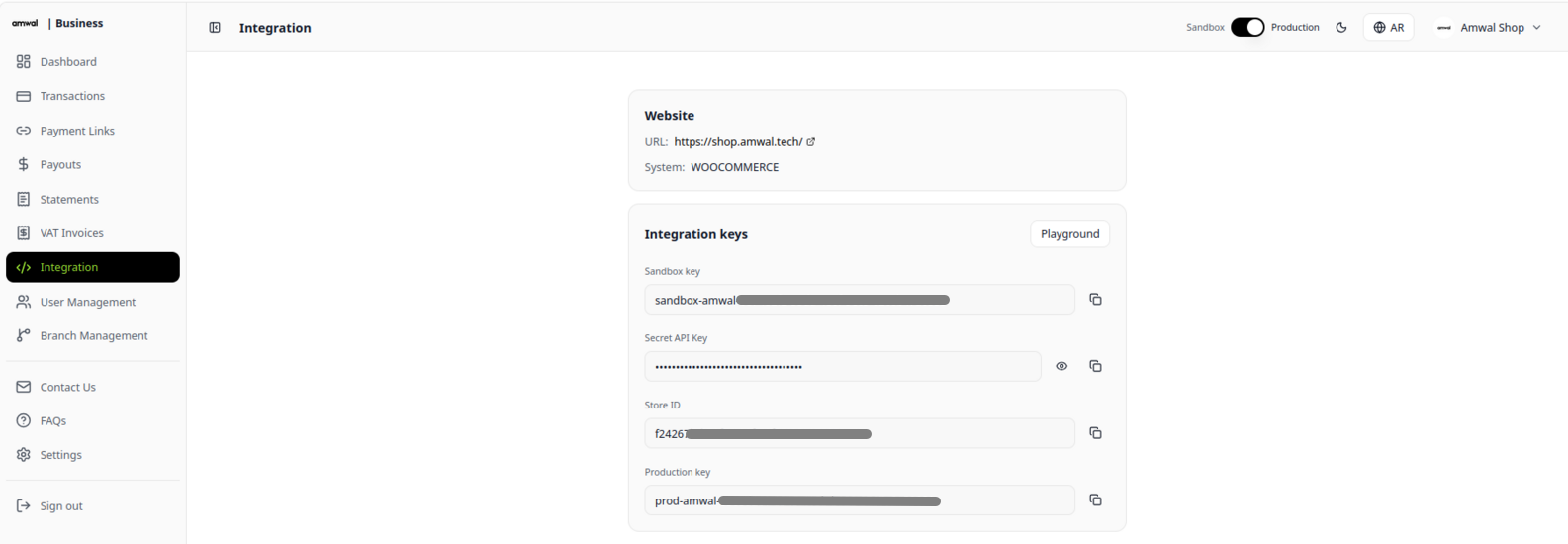
Key Types & Scopes
| Key Type | Environment / Scope | Configuration & Usage | Security Level |
|---|---|---|---|
| Sandbox Key | Test Environment | Used as merchant_id or X-Amwal-Key to test services, preview checkout, and simulate payments with test cards. | Public (Client-side & Testing) |
| Production Key | Live Environment | Generated after Go Live approval. Used as merchant_id or X-Amwal-Key for live customer installment transactions on your registered domain. | Public (Live Storefronts) |
| Secret API Key | Backend Server | Used for secure server-to-server operations, custom API integrations, transaction lookups, and automated refunds. | Private / Keep Secret |
Retrieving Your Keys
- Log in to the Amwal Merchant Dashboard.
- Select your Store from the top dropdown menu.
- Open the Integration tab:
- Sandbox Key: Copy the key value directly to initialize test checkouts.
- Production Key: Click "Go Live" to submit your corporate details for compliance approval. Once verified, your Production Key is displayed here.
- Secret API Key: Click Reveal to view and copy your private server key.
Authentication & Headers
1. Server-to-Server REST API Requests
When calling the Amwal REST API backend from your secure server (e.g. issuing refunds or retrieving transaction data), provide your credentials in the request headers:
Pass your merchant public key in the required X-Amwal-Key header:
- Sandbox:
X-Amwal-Key: sandbox-amwal-xxx - Production:
X-Amwal-Key: prod-amwal-xxx
POST /transactions/refund/60b43176-5991-4475-8ef6-c73c2417c805/ HTTP/1.1
Host: backend.sa.amwal.tech
Authorization: YOUR_SECRET_KEY
X-Amwal-Key: sandbox-amwal-xxx
Content-Type: application/json| Header | Description | Required |
|---|---|---|
Authorization | Your private Secret Key (used to authorize backend operations). | Yes |
X-Amwal-Key | Merchant Public Key (sandbox-amwal-xxx in Sandbox, prod-amwal-xxx in Production). | Yes |
Content-Type | Must be set to application/json. | Yes |
2. Client-Side Storefront & E-Commerce Plugins
In frontend storefront integrations, mobile apps, or turnkey e-commerce plugins, provide only your public Merchant ID (Sandbox Key or Production Key). Never expose your Secret Key on the client side:
Enter your public Merchant ID (and optional Secret Key for backend automated refunds) in your store administration panel:
- Shopify: Shopify App Settings
- WooCommerce: WooCommerce Amwal Settings
- Magento 2: Magento Payment Configuration
Load the official Amwal web component bundle and supply your public key via the merchant-id attribute:
<script
  type="module"
  src="https://cdn.jsdelivr.net/npm/@amwaljs/checkout-button@latest/dist/checkout/checkout.esm.js"
></script>

<amwal-checkout-button
  merchant-id="YOUR_SANDBOX_OR_PRODUCTION_KEY"
  amount="250.00"
  currency="SAR"
  country-code="SA"
  locale="en"
  enable-installments="true"
></amwal-checkout-button>
3. Incoming Webhook Authentication Headers
When Amwal dispatches real-time event notifications to your webhook listener endpoint, the request includes cryptographic verification headers:
| Header | Description | Example |
|---|---|---|
X-Signature | Base64-encoded RSA-PSS SHA-256 cryptographic signature. | eyJhbGciOiJSUzI1NiJ9... |
X-Api-Key | Webhook API key fingerprint. | 8a7d42f1c4e6ba957beec92f2cad51d0b3ec4f8c9... |
Content-Type | Payload format. | application/json |
Security Best Practices
Private Key Governance
- Never expose your
Secret API Keyin client-side HTML, frontend JavaScript, mobile app bundles, or public GitHub repositories. - Always store private keys in secure backend environment variables (
.env). - If you suspect your Secret Key has been compromised, generate a new key immediately in the Amwal Merchant Portal and update your backend services.