
Point of Sale (POS) Integration
The <amwal-pos> drop-in web component enables physical retail stores and cashiers to accept 0% bank installments at the checkout counter using a built-in touch numeric keypad, dynamic QR code generation, and real-time transaction polling.
1. POS Checkout Lifecycle
Rendering diagram...
2. Drop-in HTML Component
Include the ESM script bundle and embed <amwal-pos> on your cashier tablet or POS web terminal:
<!DOCTYPE html>
<html lang="en">
<head>
  <meta charset="UTF-8">
  <title>Amwal POS Terminal</title>
  <script
    type="module"
    src="https://cdn.jsdelivr.net/npm/@amwaljs/checkout-button@latest/dist/checkout/checkout.esm.js"
  ></script>
</head>
<body>

  <!-- Amwal In-Store POS Terminal Component -->
  <div id="pos-terminal-container">
    <amwal-pos
      auth-token="YOUR_SANDBOX_KEY"
      store-id="YOUR_STORE_ID"
      api-base-url="https://backend.sa.amwal.tech"
      currency="SAR"
      locale="en"
      min-amount="1"
      max-amount="999999"
      metadata='{"store_location": "Riyadh Olaya Branch", "cashier_id": "CASHIER-04", "terminal": "POS-01"}'
      callback-url="https://mystore.sa/webhook/pos-complete"
    ></amwal-pos>
  </div>

</body>
</html>
3. Terminal Screens & State Flow
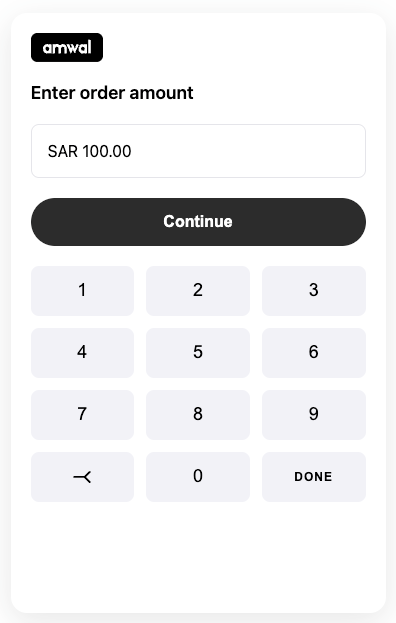
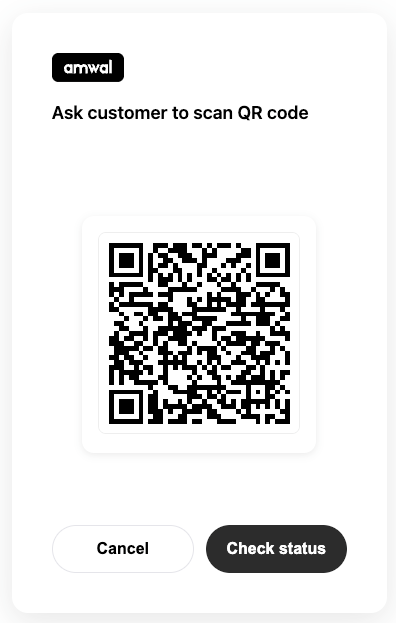
The <amwal-pos> component automatically handles state transitions across 5 dedicated screens:
| Screen State | Description |
|---|---|
amount-entry | Touch-friendly numeric keypad for entering order totals. |
qr-code | Dynamic high-resolution QR code generated for the customer to scan. |
processing | Automated background status polling every 10 seconds. |
success | Clear green success banner displaying Transaction ID and approval details. |
error | Retry prompt if the customer cancels or authorization times out. |
4. Webhook & Receipt Printing
When the customer completes installment authorization on their mobile device, Amwal dispatches a webhook to your POS server:
// Express.js POS Webhook Listener
app.post('/webhook/pos-complete', (req, res) => {
  const { transactionId, status, amount, currency, metadata } = req.body;

  if (status === 'success') {
    console.log(`POS Transaction Approved: ${transactionId} for ${amount} ${currency}`);

    // Trigger local thermal receipt printer
    printReceipt({
      store: 'Amwal Electronics - Olaya Branch',
      transactionId,
      amount: `${amount} ${currency}`,
      terminal: metadata.terminal,
      timestamp: new Date().toISOString(),
    });
  }

  res.status(200).send('OK');
});