
Google Analytics (GA4) Integration
Track user interactions with Amwal checkout buttons, monitor payment funnel conversion, and analyze installment performance in Google Analytics 4 (GA4) and Google Tag Manager (GTM).
1. Include Google Tag Manager / GA4 Script
Include the standard GA4 tag snippet in the <head> section of your storefront:
<!-- Google tag (gtag.js) -->
<script async src="https://www.googletagmanager.com/gtag/js?id=G-XXXXXXXXXX"></script>
<script>
  window.dataLayer = window.dataLayer || [];
  function gtag(){dataLayer.push(arguments);}
  gtag('js', new Date());

  gtag('config', 'G-XXXXXXXXXX');
</script>
2. Dynamic Event Listener (MutationObserver)
Because Amwal checkout buttons and widgets may be rendered dynamically by JavaScript frameworks or e-commerce themes, use a MutationObserver to ensure event listeners are attached reliably:
<script>
document.addEventListener('DOMContentLoaded', () => {
  function addAmwalCheckoutListeners() {
    document.querySelectorAll('.amwal-checkout-button, amwal-checkout-button').forEach((button) => {
      if (!button.dataset.gaListenerAttached) {
        button.addEventListener('click', () => {
          // Send custom event to Google Analytics 4
          gtag('event', 'amwal_checkout_click', {
            event_category: 'E-commerce Checkout',
            event_label: 'Amwal Bank Installments',
            value: button.getAttribute('amount') || 1,
            currency: button.getAttribute('currency') || 'SAR',
          });
        });
        button.dataset.gaListenerAttached = 'true';
      }
    });
  }

  // Observe DOM for dynamically loaded components
  const observer = new MutationObserver(addAmwalCheckoutListeners);
  observer.observe(document.body, { childList: true, subtree: true });

  // Initial check
  addAmwalCheckoutListeners();
});
</script>
3. Recommended GA4 E-Commerce Events
| Trigger Point | GA4 Event Name | Parameters Tracked |
|---|---|---|
| Widget View | view_promotion | promotion_id: "amwal_0_percent", items: [...] |
| Installment Click | select_promotion | promotion_name: "Amwal Bank Installments" |
| Begin Checkout | begin_checkout | currency: "SAR", value: 1200.00 |
| Successful Payment | purchase | transaction_id, value, payment_type: "installments" |
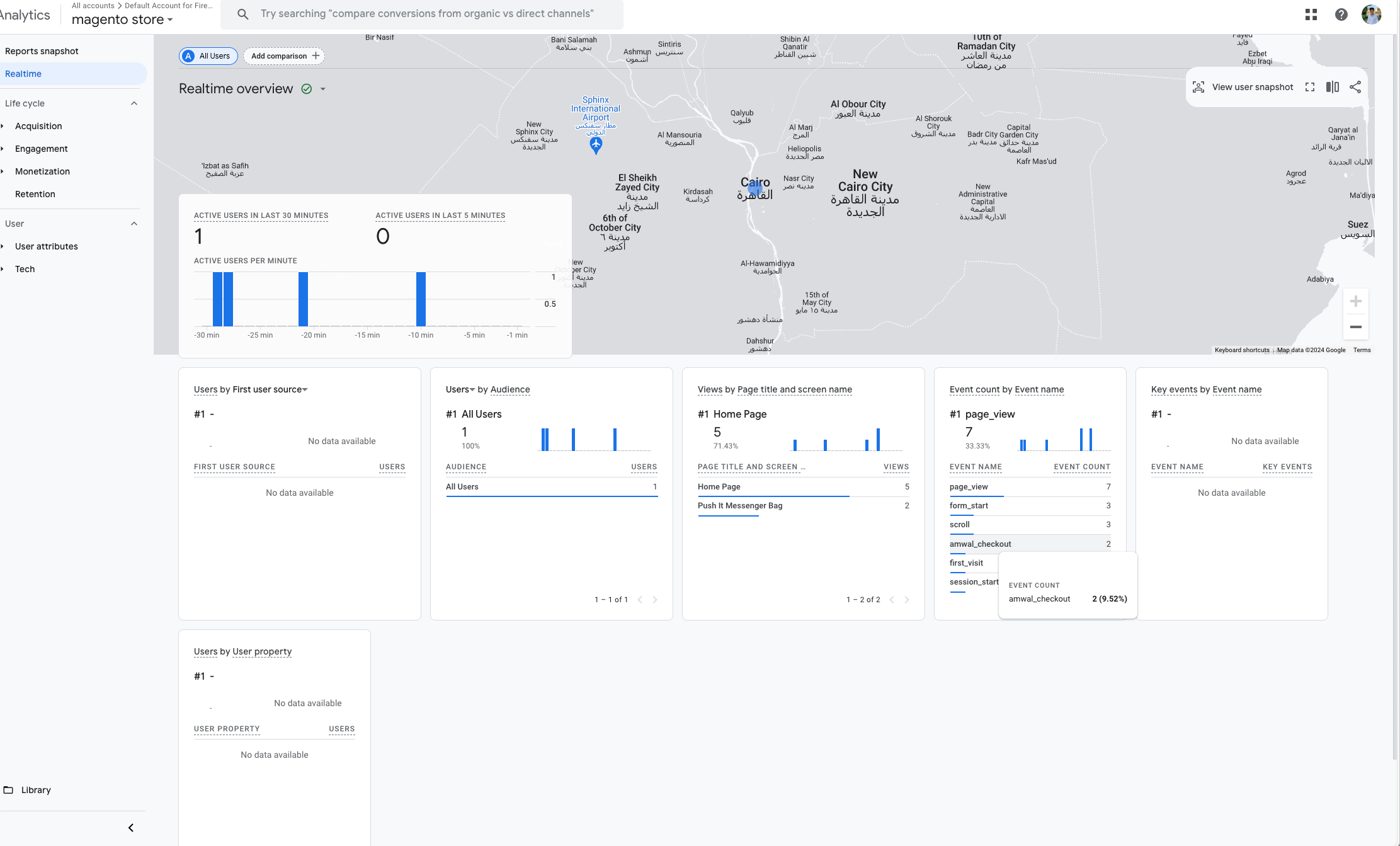
4. Google Analytics Real-Time Dashboard
Once events are fired, verify tracking in Google Analytics → Reports → Realtime → Event Count by Event Name:
Point of Sale (POS)
Integrate in-store point of sale terminals, cash registers, and dynamic QR bank installment flows using the Amwal POS component.
Marketing Toolkit Overview
Highlight Amwal Bank Installments throughout your customer touchpoints to improve conversion rates and increase Average Order Value (AOV).